

Available
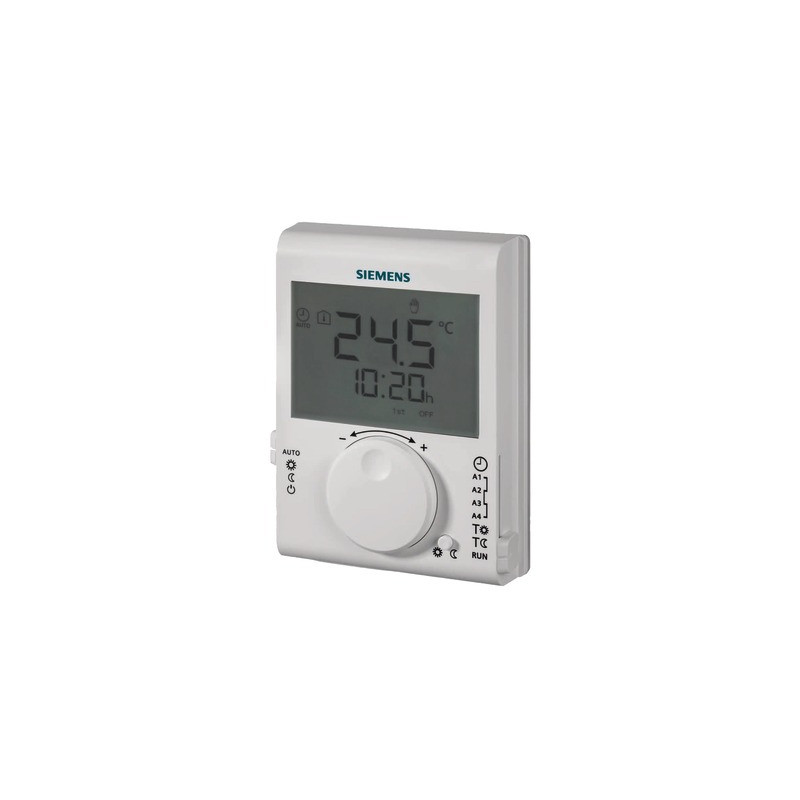
Siemens RDJ100: the wireless thermostat
Room heating thermostat Power supply voltage: 2 batteries 1.5V AAA provided Relay output type: Inverter contact, potential-free, Set value: 5?30°C LCD display Programmable Daily
How to use the Siemens RDJ100?
To change the time, simply move the cursor over the clock to turn the adjustment knob in the clockwise or anticlockwise direction (depending on whether you want to add more time or remove time). Then move the vertical programming cursor to a position to confirm the setting. The modes can be changed as follows:
Comfort mode
Move the programming cursor to the T-sun position.
The comfort temperature setting flashes.
Turn the knob to the left to lower the comfort temperature, to the right to increase it.
After the comfort temperature has been set, move the cursor to any position to confirm the setting.
Adjust the first switch-on time
Move the programming cursor to the A1 position.
The first switch-on time setting flashes.
Turn the knob to the left to adjust the time backwards, to the right to adjust it forwards.
After the start time has been set, move the cursor to any position to confirm the setting.
Adjust the second switch-on time
Move the programming cursor to the A3 position.
The second switch-on time setting flashes.
Turn the knob to the left to adjust the time backwards, to the right to adjust it forwards.
After the start time has been set, move the cursor to any position to confirm the setting.
Setting the temporary comfort temperature
Turn the knob clockwise or anticlockwise to set the desired temperature when the speed selector is on Comfort (temporarily override the comfort temperature).
The temporary override of the comfort temperature is cancelled when the speed changes.
Energy saving mode
Move the programming cursor to the T-moon position. The energy saving temperature setting flashes.
Turn the knob to the left to lower the economy temperature, to the right to increase it.
After the economy temperature has been set, move the cursor to any position to confirm the setting.
Adjust the first switch-on time
Move the programming cursor to the A2 position.
The first switch-off time setting flashes.
Turn the knob to the left to adjust the time backwards, to the right to adjust it forwards.
After the switch-off time has been set, move the cursor to any position to confirm the setting.
Adjust the second switch-on time
Move the programming cursor to the A4 position.
The second switch-off time setting flashes.
Turn the knob to the left to adjust the time backwards, to the right to adjust it forwards.
After the start time has been set, move the cursor to any position to confirm the setting.
Features of product: DAILY ROOM THERMOSTAT- SIEMENS - RDJ100

In building management systems (BMS), Siemens components are essential for automation. A high-performance system relies on seamless communication between the measuring device and the control element.
The Siemens thermostat is the dialogue point between the user and the heating system. It is not just used to display the temperature but also to finely control heating, often through sophisticated protocols.
We provide wired or wireless programmable room thermostats, essential for managing independent heating zones and optimizing time slots. Choosing the right model ensures precise settings (+/- 0.5°C), directly translating into savings.
The Siemens actuator is the hydraulic actuator. Its role is to precisely position valves (mixing valves or zone valves) in order to control the flow of hot water to a given circuit.
As the centerpiece of the heating zone, it must be fully compatible with the regulation electronics (0-10V signal, 3 points) and the valve it is mounted on. Replacing a faulty actuator allows for immediate restoration of optimal control over the water mix (supply/return) and avoids unnecessary overheating.
With Siemens' extensive and highly technical range, it is vital to check the specifications of the part to be replaced:
Product reference: Always rely on the 7 or 8 character code on the label (e.g., RDE10.1). This code determines the function, voltage, and communication protocol.
For Actuators: Check the power (torque) and stroke duration (opening/closing time) to ensure it can move your valve.
Expert Tip: When replacing a Siemens thermostat or a Siemens actuator, check the configuration of the dip switches or the initial programming. Incorrect calibration of the zero point or end stroke can lead to malfunctions, even if the part is new.
Ensure the reliability of your regulation system with ExpertByNet, the specialist in Siemens components for HVAC.
| Carrier | Information | Price | Delivery |
|---|
